Page 1 of 1
i2 Pro video stuttering

Posted:
Tue Jan 09, 2024 11:13 pmby ruisoares
Hello,
I am using MoTeC i2 Pro (1.1.5.192) with license to open std files in it.
Up until August 2023 I had no problem syncing videos and running them with data. Since then, I have a lot of stuttering and can't run data with the video smoothly. I updated all codecs with the instal files available on website and even installed VLC as read on some "video stuttering" search that it had some more codecs than usual, but still is not working.
I have changed laptop meanwhile but the problem persists. Anyone had same issue? It's like if the video is changing frame every 0.5sec or something. Also the sound makes the same.
Thanks in advance, I am really frustrated I couldn't find a solution yet hence why I decided to open the topic.
rui
Re: i2 Pro video stuttering
Posted:
Wed Jan 10, 2024 11:19 amby Stephen Dean
Hi,
When this occurs, do you have the video window highlighted in i2? If the video window is not the highlighted window, then the video is stepped between the video sync points.
Re: i2 Pro video stuttering
Posted:
Wed Jan 10, 2024 6:38 pmby ruisoares
Hello, yes, I click on the video window to highlight it.
I have also try to mute sound to see if the footage would improve but no diference.
Thanks already for the feedback
Re: i2 Pro video stuttering
Posted:
Wed Jan 10, 2024 8:51 pmby ruisoares
Hello,
Not sure why previous reply didn't come up but I do have it highlighted.
Re: i2 Pro video stuttering
Posted:
Thu Jan 11, 2024 3:28 pmby NathanB
What version of windows do you run and what is the source of the video (V2, Vbox, AiM etc)
Also how are you loading the videos into i2? Are you loading them into the video pane, or do you have i2 aimed at the folder with the videos for auto syncing with tools > Options > Video Search folder
Re: i2 Pro video stuttering
Posted:
Fri Jan 12, 2024 2:56 amby ruisoares
Hello,
Windows 11, 64-bit.
I have a folder on the laptop where I keep event data and videos (although in separate folders). They are AIM videos. So not on a specific video folder.
Re: i2 Pro video stuttering
Posted:
Sat Jan 20, 2024 2:02 amby ruisoares
Hello,
I have uninstalled some codecs and installed again and problem persists. I have increased RAM memory but still there. can it be related to windows 11?
Thanks in advance
Re: i2 Pro video stuttering
Posted:
Wed Jan 24, 2024 8:11 amby NathanB
Which version of i2 are you using?
The FFD show codecs are not used for current versions of i2, the display codecs are inbuilt into the software.
As you are on windows 11, is your windows installation set to used balanced/efficiency mode for i2, or performance? This is set via System > Display > Graphics
My only other question would be the video properties for the video file from the smarty cam:
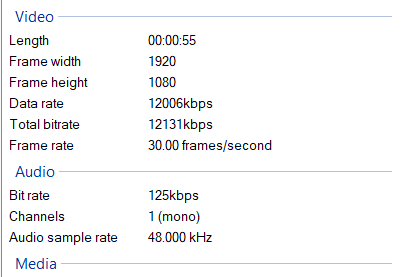
- Video Properties.png (11.91 KiB) Viewed 10518 times
Example of an MP4 file from a VBox for reference
Re: i2 Pro video stuttering
Posted:
Thu Jan 25, 2024 10:13 pmby ruisoares
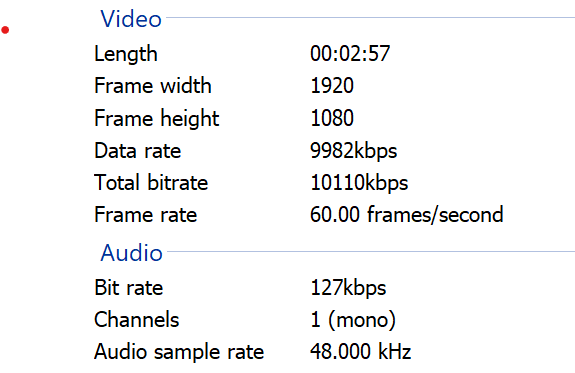
- Näyttökuva 2024-01-25 121101.png (23.42 KiB) Viewed 10476 times
Hello,
Thanks for the help.
I am using 1.1.5.192 and I made the changes on graphics to performance but issue still there. in terms of video properties:
[img]
Näyttökuva%202024-01-25%20121101.png
[/img]